Loading…
Save NewRide to your home screen
Put NewRide on your phone's home screen so it opens full-screen like an app — no app store needed.
Last updated 17 September 2026
It functions just like an app
Add NewRide to your phone's home screen and it launches full-screen, with no tabs or address bar in the way — just an icon you tap, like any other app.
It's still the exact same NewRide you use in your browser: your account, watchlist, listings and messages are all there, and signing in works exactly the same.
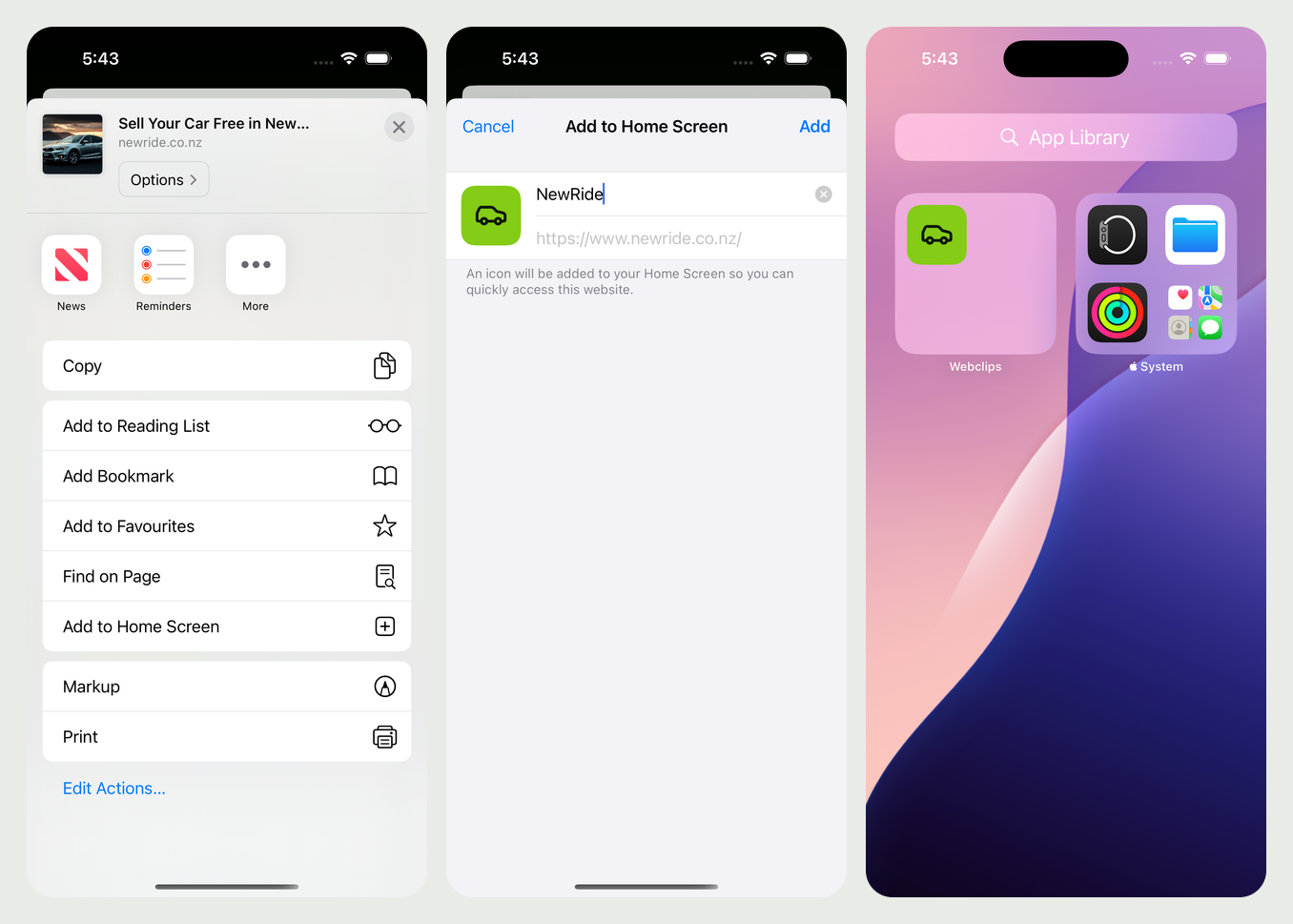
On an iPhone
- Open newride.co.nz in Safari.
- Tap the Share button — the square with an arrow pointing up, at the bottom of the screen.
- Scroll down the list and tap Add to Home Screen.
- Tap Add.
On Android
- Open newride.co.nz in Chrome.
- Tap the ⋮ menu at the top right of Chrome.
- Tap Add to Home screen.
- Tap Install.
Removing the app
Removing the icon works like any other app — press and hold it, then choose Remove. That only removes the shortcut; your NewRide account and everything in it stay exactly as they are.
Questions about this article? Email [email protected].
Back to help